

It is important to update your passport on the OCI portal after renewing your passport; it prevents any potential issues during international travel because, at the time of immigration, Indian authorities match your document with your current one.
If your passport is not updated and you are searching online for how to update your passport on the OCI portal, you are on the correct platform.
Keep reading this Guide to know the complete Process, Fees, Timeline and the documents required to update your passport online.
Is it Mandatory to Update Passport Details in Your OCI Card?
Yes, OCI cardholders must update their new passport details on the official OCI portal when they receive a new passport. However, updating passport information does not necessarily mean applying for a new physical OCI card.
The requirements depend on your age and OCI registration category:
Current MHA Guidelines and Rules
According to the official OCI Miscellaneous Services FAQs, eligible OCI cardholders can upload their new passport details and latest photograph through the online portal.
The general requirements are:
- OCI cardholders below 20 years must upload their new passport details each time a new passport is issued.
- OCI cardholders who obtained OCI registration before turning 20 must generally apply for OCI card re-issuance when they receive a new passport after turning 20.
- OCI cardholders who receive a new passport after turning 50 must upload their passport details and latest photograph as prescribed.
- Foreign spouses registered as OCI cardholders under the spouse category must follow the specific update requirements applicable to them whenever a new passport is issued.
The three-month submission period generally applies from the date the new passport is received. Check the official guidance for your specific category before submitting your application.
Age-Wise OCI Passport Update Rules
| Age or category | General requirement |
| Below 20 years | Upload new passport details and a recent photograph each time a new passport is issued. |
| After turning 20 | If registered as an OCI cardholder before age 20, apply for OCI card re-issuance when a new passport is issued after turning 20. |
| After turning 50 | Upload new passport details and a recent photograph as prescribed. |
| Spouse-based OCI | Follow the specific passport update and declaration requirements applicable to spouse-based registration. |
Important: These rules describe the general requirements in the official OCI FAQs. Applicants who obtained OCI registration after turning 20 should not assume that the same re-issuance requirement applies to them. Confirm the applicable procedure on the official portal.
Now, first know who can update their detail on OCI portal
Who Is Eligible to Update Details on the OCI Portal?
The following OCI cardholders can apply for passport detail updates or other changes through the official OCI Miscellaneous Services portal:
- OCI cardholders who have renewed or received a new foreign passport.
- Children below 20 years who receive a new passport and need to upload their updated passport details and photograph.
- OCI cardholders aged 20 years and above who receive a new passport and need to follow the applicable OCI update or re-issuance requirements.
- OCI cardholders aged 50 years and above who receive a new passport and need to update their passport details as required.
- Foreign spouses of Indian citizens or OCI cardholders who receive a new passport and need to update their records.
- OCI cardholders with changed personal details who need to correct or update details such as their name, nationality, address, or occupation, where applicable.
Next Move to when it is required from Below
When Is OCI Card Update Required?
You need to apply for an OCI update in the following situations:
- Issuance of a new passport (age-based and validity-based updates)
- Change in name due to marriage, divorce, or legal procedures
- Change in nationality or citizenship status
- Correction of personal details such as date of birth or place of birth
- Change in appearance (in certain cases)
- Loss or damage of OCI card
- Updating address or occupation if required
Failure to update OCI details when required may lead to issues during airline check-in or immigration clearance in India.
Documents required to update passport on OCI portal
Here is the list of documents that you will need to apply for the OCI update.
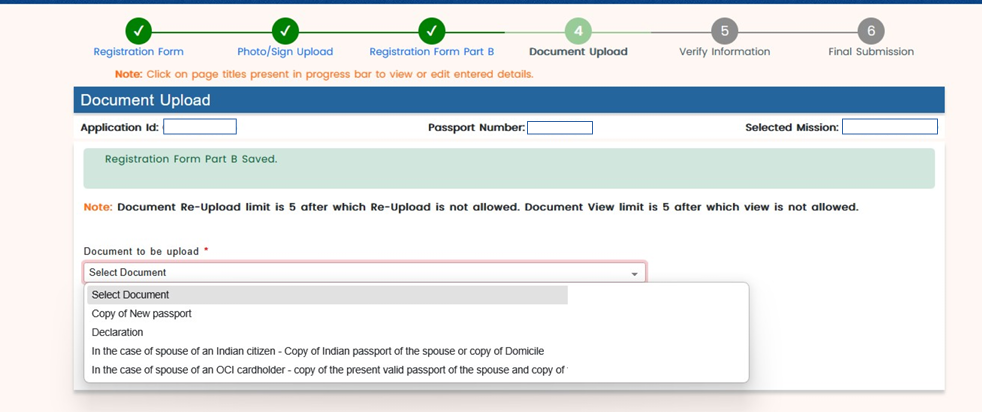
- Copy of New Passport
- Declaration
- In the case of spouse of an Indian citizen – Copy of Indian passport of the spouse or copy of Domicile
- In the case of spouse of an OCI cardholder – Copy of the present valid passport of the spouse and copy of OCI Card
How to update passport details on OCI Portal- Steps to Follow
Below are the detailed steps given below for OCI update applications:
Important Note: Eligible passport detail uploads are generally free if submitted within three months of receiving your new passport. However, OCI card re-issuance is a separate process and may involve additional fees and supporting documents. Always check the requirements for your specific application.
Step 1: Go to the Official OCI Portal
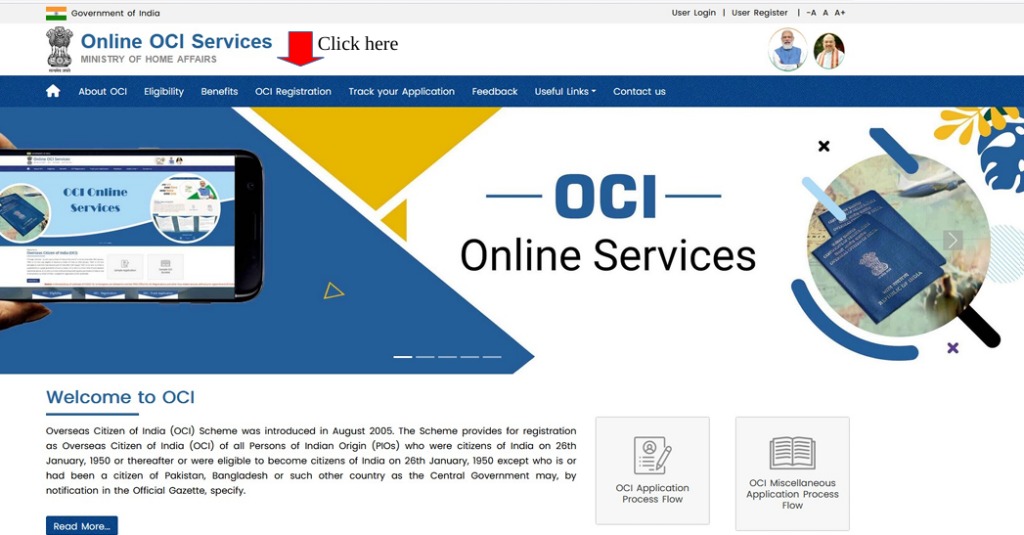
- Visit the official Ministry of Home Affairs website for OCI services.
- Click on the OCI Miscellaneous Services section
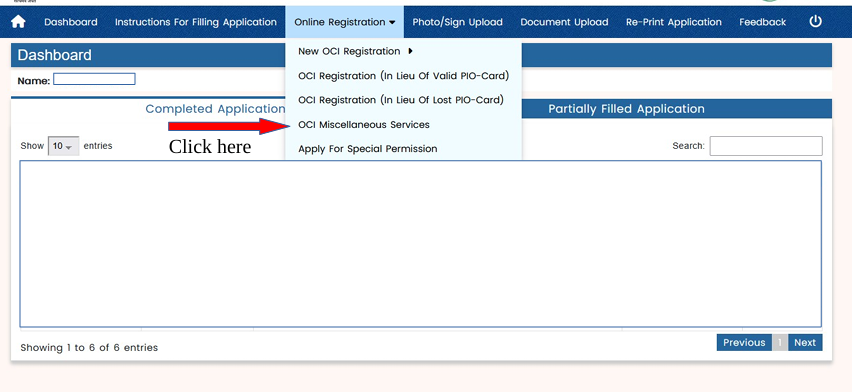
Step 2: Enter Your OCI Registration and Passport Details
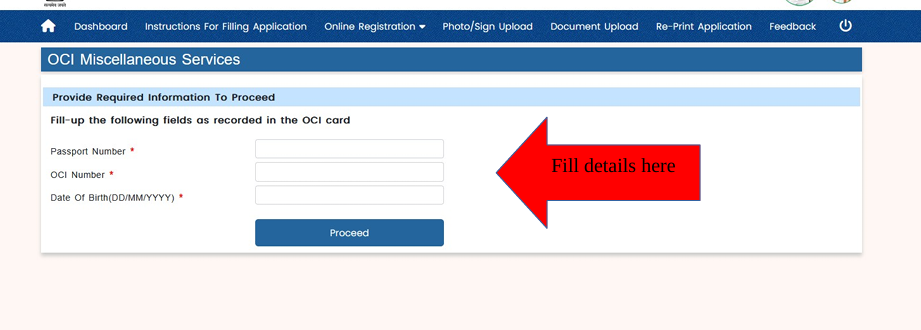
- Enter your existing passport number & OCI registration number.
- Provide your date of birth and complete the captcha verification, if prompted.
- Click on the Proceed button.
Step 3: Now choose “Passport Particulars Update”
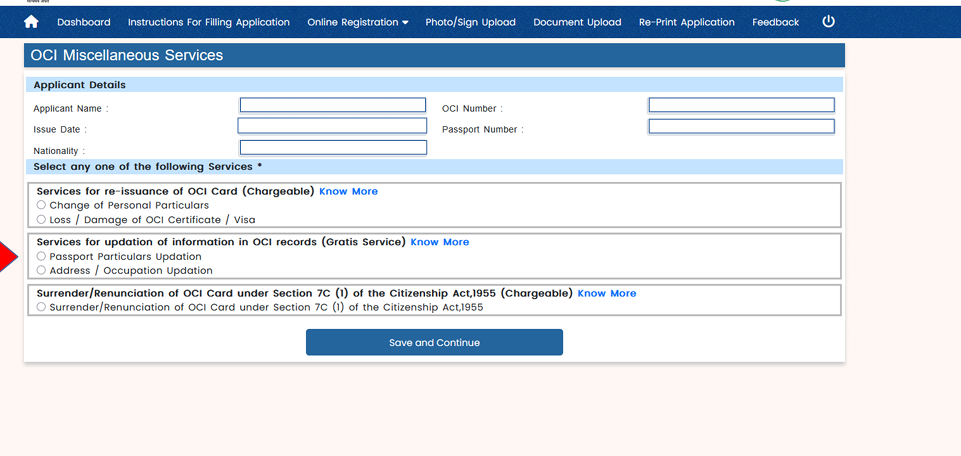
Step 4: Fill in all the current details of the new passport/address/occupation, and then click on ‘Save and continue’
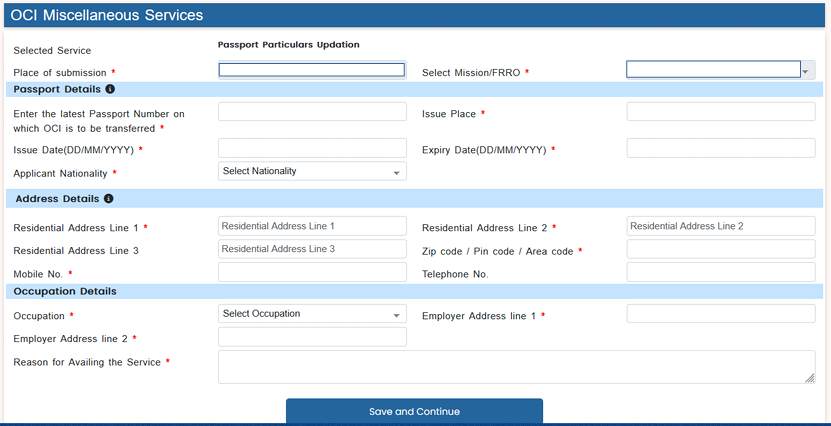
Step 5: Upload Your Photograph and Signature
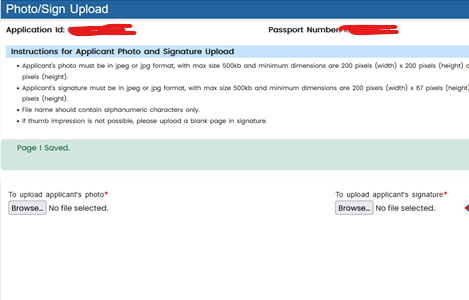
- Upload your recent photograph in the format specified by the portal.
- Upload Signature
Instructions for Applicant Photo and Signature Upload
- Applicant’s photo: Must be in JPEG or JPG format. Maximum file size: 500 KB. Minimum dimensions: 200 × 200 pixels. Maximum dimensions: 3500 × 3500 pixels.
- Applicant’s signature: Must be in JPEG or JPG format. Maximum file size: 500 KB. Minimum dimensions: 200 × 67 pixels. Maximum dimensions: 3500 × 2500 pixels.
- File name: Must contain alphanumeric characters only.
- Thumb impression: If a thumb impression is not possible, upload a blank page in the signature section.
Step 6: Fill the part B form and click on ‘Save and continue’
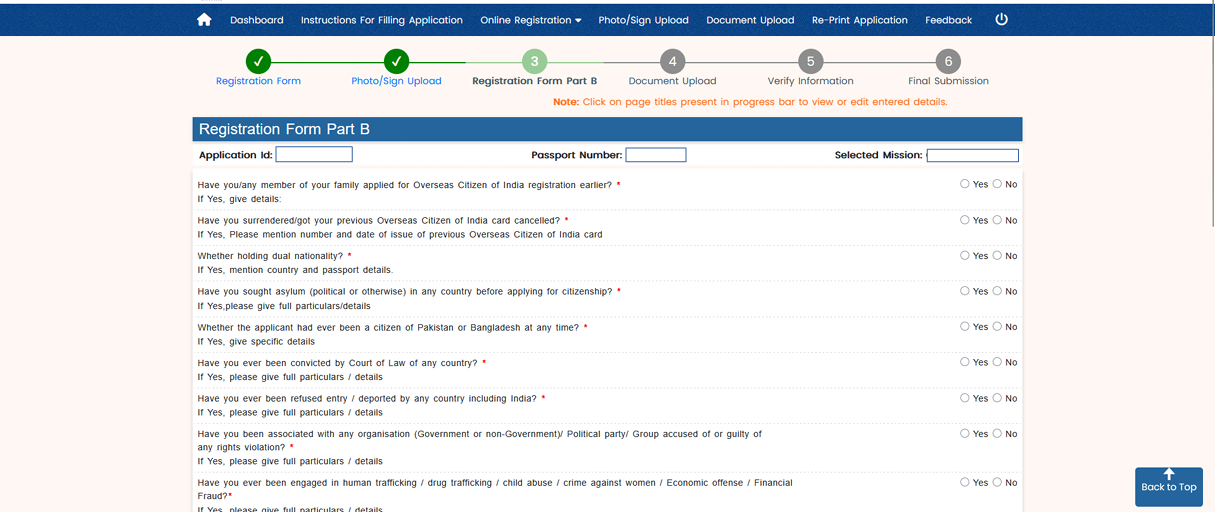
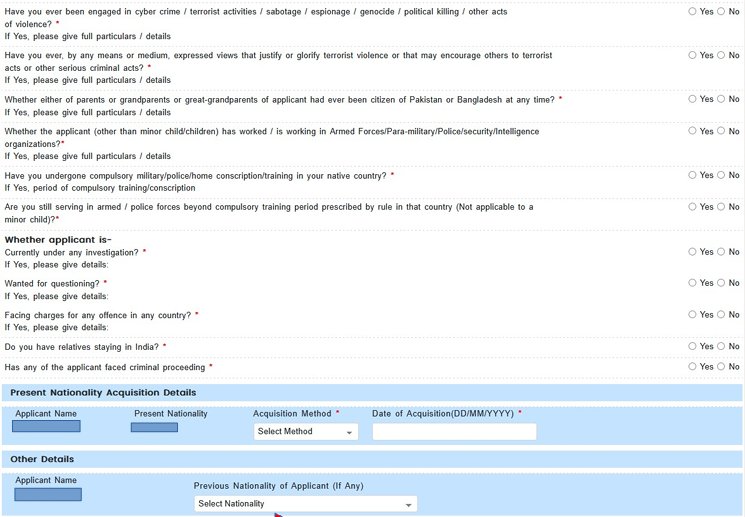
Step 7: Upload Documents
Complete list of documents given above:
Step 8: Review and Submit Your Application
Verify all the information and if required, modify the information or click on final submit.
Keep the reference details safe, as you may need them to check your application status later.
Step 9: Document Verification
Now, the authorities will verify your OCI documents for a smooth application process.
OCI Update Processing Time
Typical processing timelines include:
– Passport detail updates: 3 to 6 weeks
– Name or personal detail correction: 6 to 10 weeks
– Lost or damaged OCI replacement: 6 to 8 weeks
Processing time varies based on update type, jurisdiction, and document accuracy.
COMMON MISTAKES IN OCI UPDATE APPLICATIONS
– Choosing the wrong miscellaneous service category
– Missing mandatory updates after passport renewal
– Inconsistent name or personal details across documents
– Uploading unclear or incorrectly formatted files
– Submitting under incorrect jurisdiction
Careful application review helps avoid delays and resubmissions.
Thanks for reading. Hope you now understand the process of updating your passport details on the OCI portal.
