

Are you an NRI with a bank account in India? You might be trying to log in to your account, file your ITR, or complete OTP verification, and at the moment you attempt to log in, the OTP is sent to a mobile number that is no longer valid or has been deactivated for some reason. This common issue is faced by NRIs trying to access their accounts from abroad.
In this case, every NRI must Change Mobile Number in PAN Card to complete their financial and Income Tax Department transactions. The good news: You do not need to travel back to India to update your details. You can complete the entire process online without visiting anywhere.
In this guide, you will learn how NRIs can update their mobile number in their PAN card details online.
Important: Fees, timelines, and portal steps mentioned below are based on the official Protean (NSDL) and UTIITSL processes as of the last update date above. Government portals occasionally revise fees and workflows, so cross-check the details from the official Protean PAN portal or Income Tax e-Filing portal before submitting your application.
Key Takeaways
- NRIs can update their mobile number online through the official Protean (formerly NSDL) or UTIITSL portals without flying back to india.
- International Numbers Allowed: You can link an international mobile number to your PAN card by paying the applicable international dispatch/processing fee.
- It takes a few minutes. If your Aadhaar is linked with an active Indian number, it takes a few minutes. If not, you can submit the application online using physical document verification via mail.
- Turnaround Time: Online e-Sign updates take about 3 to 7 working days, while paper-based processing takes 15 to 20 business days.
- Fees for Updating Number: NRI PAN Update fees range from ₹66 to ₹1,017, depending on the submission method and whether you need a physical PAN card or e-PAN.
Prerequisites: What You Need Before Starting
Before sitting down to fill out the form, keep these documents Ready:
- Existing PAN Number (copy of your PAN card)
- Passport copy (proof of identity for NRIs)
- Proof of address (bank statement in your country of residence, Indian passport, or utility bill)
- Active email address (crucial for receiving OTPs and tracking status)
- International or Indian mobile number (ready to receive OTPs)
Note: If you are an NRI submitting documents physically (Option C), your foreign address proof or identity documents may require attestation by the Indian Embassy/Consulate or a Notary Public in your country of residence.
Step-by-Step Guide to Change Mobile Number in PAN Card Online (NRIs)
There are two online portals to change a mobile number, i.e., the Protean e-Gov PAN portal (formerly NSDL) and the UTIITSL Portal.
Steps to Change Mobile number through Protean e-Gov PAN portal
Step 1: Visit the official Protean (NSDL) Online PAN Portal.
- Under Application Type, select “Changes or Correction in existing PAN Data / Reprint of PAN Card”.
- Under Category, select “Individual” PAN card.
- Fill in your basic details such as Name, Date of Birth, Email ID, Mobile Number, and existing PAN.
- Tick the consent box, enter the Captcha, and click Submit.
- You will receive a Token Number via email. Save this token number to resume your application if your session times out.
Step 2: Choose Your Submission Mode
You will be offered three options to submit your documents:
- Option A — Digital e-KYC & e-Sign (Paperless): Best for NRIs who have an Aadhaar card linked to an active phone number.
If your registered Indian number is currently inactive or you do not receive roaming SMS abroad, you cannot use Option A.
In this case, please select Option B (if you have soft copies of documents) or Option C (physical document delivery).
- Option B — Scanned images through e-Sign: Best for NRIs who have Aadhaar but want to upload specific passport/address documents.
- Option C — Forward application documents physically: Best for NRIs without an Aadhaar card or who cannot complete online OTP verification.
Step 3: Enter Personal and Contact Details
- Now check the box next to “Telephone Number & Email ID Details” to indicate you want to update this field.
- Under Country Code, select your current country of residence (e.g., +1 for USA/Canada, +44 for UK, +971 for UAE).
- Enter your active international or Indian mobile number.
- Select your address for communication (Foreign or Indian). If you choose a foreign address, a physical copy of the updated card will involve international courier charges.
Step 4: Pay the Processing Fee
Payment can be made using an international credit card, debit card, or net banking:
| Delivery Option | Approximate Fee |
| Physical PAN card sent outside India | ₹1,010 – ₹1,020 (inclusive of processing + international dispatch) |
| e-PAN only, or delivery to an Indian address | ₹110 |
Delivery Option Approximate Fee
- Physical PAN card sent outside India ₹1,010 – ₹1,020 (inclusive of processing + international dispatch)
- e-PAN only, or delivery to an Indian address ₹110
Note: Fees are subject to change by NSDL/Protean — verify the exact current amount at the time of payment.
Step 5: Complete Authentication or Mail Documents
- For e-Sign users: Enter the OTP sent to your Aadhaar-registered mobile number/email to digitally sign the application. No physical mailing is required.
- For physical submission users: Download the generated Acknowledgment Receipt, print it, affix two recent passport-size photos, and sign across the photo and signature boxes. Mail this packet along with self-attested copies of your Passport, Address Proof, and PAN card to the NSDL office in Pune, India.
Steps to Change Mobile number through the UTIITSL Portal.
Step 1:- Visit the Official Website of UTIITSL
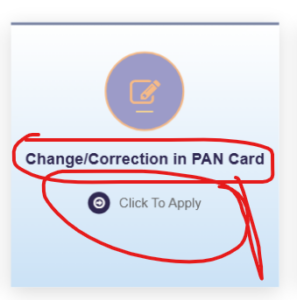
Step 2: Click on ‘Click to Apply’ under the ‘Change/Correction in PAN Card’ tab.
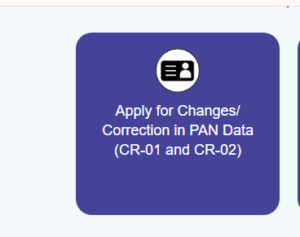
Step 3: Select ‘Apply for Change/Correction in PAN card details.’
Step 4: Choose the mode of document submission, enter your PAN number, select the PAN card mode, and click ‘Submit ‘.
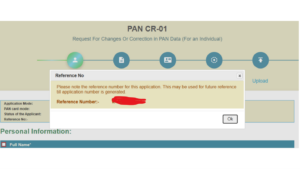
Step 5: After registration, you’ll receive a reference number. Click ‘OK.’
Step 6: Provide your name and address, then click ‘Next Step.’
Step 7: Enter your PAN number for verification and click ‘Next Step.’
Step 8: Upload the necessary documents listed above and then click on the ‘Submit’ button.
Note: When you submit for any changes, your PAN needs 15 days. You’ll receive a text message on your registered mobile number once your PAN card is dispatched via post.
How NRIs can update their PAN card offline: Steps to follow
Step 1: Visit the Official Website utiitsl.
Step 2: Download the form “Request for New PAN Card or/and Changes or Correction in PAN Data”.
Step 3: Fill out the Form with black INK and Capital Letters (BLOCK LETTERS)
Step 4: Upon submission and payment, you’ll receive an acknowledgement slip at the centre.
Step 5: Collect the 15-digit Acknowledgment Slip from the center and track your application status online.
5 steps to Track Your PAN Application Status
- Once submitted, you will receive a 15-digit Acknowledgment Number.
- Visit the Protean PAN Tracking Portal.
- Select “PAN – New / Change Request”.
- Enter your 15-digit Acknowledgment Number and fill in the CAPTCHA.
- Click Submit to check the real-time status of your request.
Also Read:
- How to check PAN Card Status through NSDL and UTIITSL, Aadhar and Name Quick and Easy steps)
- UTI PAN Card Status Check: The Only Guide You’ll Need
How to Verify If Your Mobile Number is Successfully Updated
- Go to the official Income Tax e-Filing Portal.
- Under Quick Links, click on “Verify Your PAN”.
- Enter your PAN Number, Full Name, Date of Birth, and your New Mobile Number.
- Click Continue.
- If updated, an OTP will immediately arrive on your new number with the status message: “PAN is Active and details are matching with PAN database.”
Essential Tips for NRIs
- Always update email alongside mobile: Make sure your primary email address is updated in the same form. The Tax Department relies heavily on email communications for NRIs.
- Check bank linking: Once your mobile number is updated in your PAN, inform your NRE/NRO account bank so their records match, preventing any sudden account freezes under KYC norms.
- Download the e-PAN: As soon as your application is approved, download your updated e-PAN card PDF directly from the portal using your acknowledgment number.
Related Articles
PAN Card: Complete Guide to Application, Eligibility, Fees (2026)
Frequently Asked Questions
Can NRIs update PAN mobile number without an Aadhaar card?
Yes. NRIs without Aadhaar can use Option C (physical document submission) — mailing self-attested copies of passport, address proof, and PAN to the NSDL office in Pune.
How long does it take to update the mobile number in PAN?
Online e-Sign applications typically take 3 to 7 working days. Physical/paper-based applications take 15 to 20 business days.
Is there a separate fee for NRIs compared to resident Indians?
Yes, if the physical PAN card needs to be dispatched outside India, an additional international dispatch fee applies (approx. ₹1,010–₹1,020 total). If only an e-PAN is needed, the fee is significantly lower (approx. ₹110).
This article is for informational purposes only and does not constitute professional tax or financial advice. For case-specific guidance, consult a qualified Chartered Accountant or refer directly to the Income Tax Department’s official website.
