

Are you an OCI cardholder? For an existing OCI cardholder, keeping your registration updated with your current foreign passport or personal details is mandatory. The process can be completed online through the official Ociservices.gov.in portal;choosing the right category, meeting the correct document size requirements, and avoiding VFS/Consulate rejections can be tricky.
This complete guide walks you step-by-step through applying for OCI Miscellaneous Services online, including exact document requirements, fee breakdown, image formatting specs, and how to avoid common rejection errors.
Key Takeaways
- Purpose: OCI Miscellaneous Services are strictly for existing OCI cardholders updating details—not for new OCI applications.
- Mandatory Passport Updates: Updating your OCI details is required every time a new passport is issued up to the age of 20, and once after turning 50 years of age.( Learn how to update passport details on the OCI portal.)
- Cost: The cost to update is free; re-issuance of a physical card or address/detail changes incur official consulate/VFS processing fees.
- File Specs: Photos must be 51×51 mm (JPEG, under 200 KB) and supporting PDFs must be under 500 KB per document.
- Tracking: Always save your OCI File Reference Number (starts with .., GBR…, CAN…, etc.) after step 1 submission.
What Are OCI Miscellaneous Services?
OCI Miscellaneous Services allow existing OCI registration holders to update their personal record, address, legal name, or foreign passport details directly in the Ministry of Home Affairs (MHA) database.
Important Rule Change: Under the streamlined OCI guidelines, you no longer need to apply for a physical re-issuance of your OCI card every time you renew your passport between ages 21–49. You simply upload your new passport copy and updated photo online free of cost.
Types of OCI Miscellaneous Services Available
| Service Type | When to Select | Physical Card Re-issued? | Fee Applicable? |
| Passport/Photo Update (Online) | New passport issued (Below 20 yrs or After 50 yrs) | No | Free (Upload only) |
| Change of Personal Details | Change in Name, Nationality, or Father/Mother Name | Yes | Yes (Consulate/VFS Fee) |
| Loss or Damage of OCI Card | Lost, stolen, or damaged physical OCI booklet | Yes | Yes (Higher Replacement Fee) |
| Change of Address / Occupation | Moving to a new residential address | No | Free / Nominal |
How to Apply for OCI Miscellaneous Services Online: Step-by-Step Guide
Step 1: Visit the Official Portal
- Visit the official government website: https://ociservices.gov.in
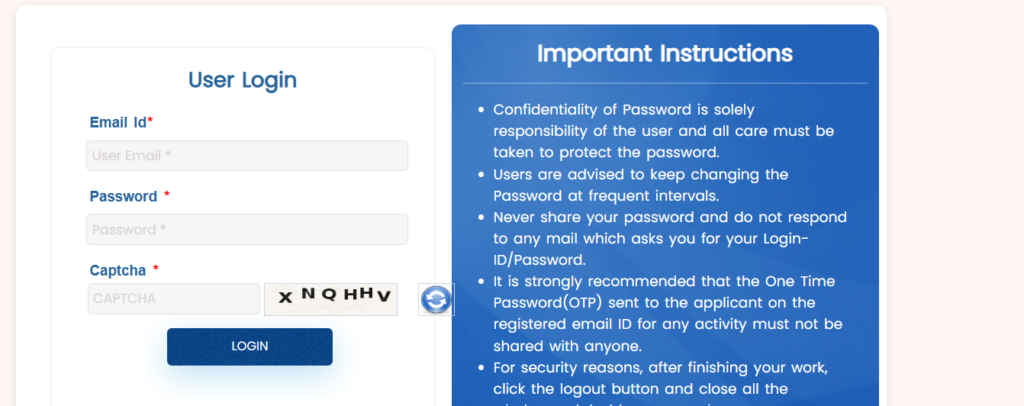
Step 2: Log in to the Portal
- Enter your credentials: Email ID and passport number, and fill in the CAPTCHA
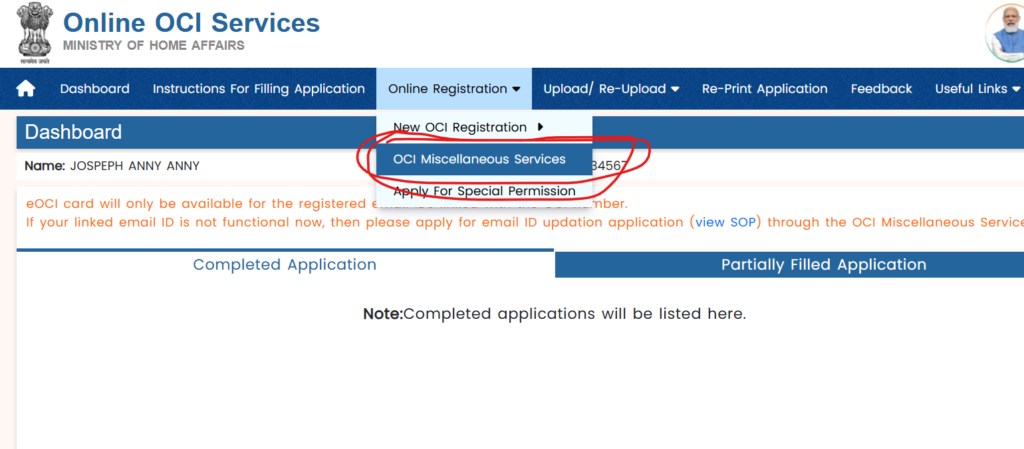
Step 3: Select OCI Miscellaneous Service
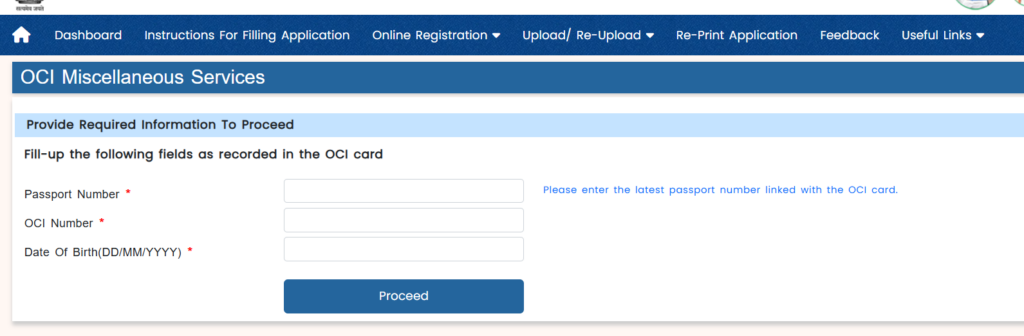
Step 4: Enter Existing OCI & Passport Details
Enter your credentials exactly as printed on your original documents:
- Existing OCI Number (e.g., A1234567)
- Current Registered Passport Number
- Date of Birth
Step 5: Select Your Required Service Option
Choose the exact category matching your requirement:
- Select “Update Passport / Photo Details” if you are uploading new passport pages without changing legal name details.
- Select “Re-issuance of OCI” if you require a new physical OCI card to be printed (e.g., lost card or legal name change).
Step 4: Upload Photo and Signature Specifications
Ensure your media files strictly adhere to these official specs:
- Applicant Photograph:
- Dimensions: $51 \text{ mm} \times 51 \text{ mm}$ ($2 \times 2$ inches)
- Format: JPEG / JPG (Max file size: 200 KB)
- Background: Plain light/white background with full face clearly visible.
- Applicant Signature / Thumb Impression:
- Aspect Ratio: 1:3 (Height to Width)
- Format: JPEG / JPG (Max file size: 200 KB)
- Note: Minor children unable to sign must use a left thumb impression (blue/black ink).
Step 5: Upload Supporting Documents (PDF Format)
- Files must be scanned clearly in PDF format (Max file size: 500 KB per file).
- Multi-page documents (e.g., old + new passport pages) must be merged into a single PDF file.
Documents Required for OCI Miscellaneous Services
For New Passport Update (Free Online Upload):
- Scanned copy of New Foreign Passport (Photo page showing passport number, validity, and personal details)
- Scanned copy of Existing OCI Card (Front and Back pages showing registration details)
- Proof of current address (Utility Bill, Driving License, or Bank Statement)
For Name or Detail Change / Lost Card:
- Legal Marriage Certificate, Gazette Notification, or Name Change Deed (if changing name).
- Police Report / FIR (In case of Lost or Stolen OCI booklet).
- Original Damaged OCI Booklet (In case of physical damage).
OCI Miscellaneous Fees & Processing Time (2026 Breakdown)
Fees
- Online Passport Upload Service: $0 / Free
- Re-issuance / Loss / Personal Detail Changes:
- Government Fee: Approx. $25 USD (or local currency equivalent: £21 GBP / $35 CAD).
- Lost/Damaged OCI Fee: Approx. $100 USD.
- Note: VFS / BLS / Indian Consulate service charges and return courier costs apply extra where physical submission is necessary.
Processing Timelines:
- Online Passport Updates (Upload Only): 3 to 6 weeks for automated portal acknowledgment.
- Physical Re-issuance (Card Printing): 4 to 8 weeks depending on the Indian Embassy/Consulate jurisdiction.
Top Reasons for Application Rejection & Delays
- Unclear Scans: Uploading blurry, cut-off, or low-resolution camera photos instead of proper flatbed scans.
- Name Discrepancies: Middle name missing on the application form that exists on the new foreign passport.
- Incorrect Document Grouping: Uploading passport pages in the address proof slot or vice versa.
- Signature Aspect Ratio Error: Signature stretched horizontally or vertically during upload.
Frequently Asked Questions (FAQs)
Q1. Do I need to surrender my physical OCI card when I get a new passport?
No. Your existing physical OCI card remains valid alongside your new passport, provided your updated passport details are registered on the OCI portal.
Q2. Is it mandatory to visit VFS or BLS centers for updating passport details?
No. If you are only updating your passport details or address online (where no physical re-issuance is triggered), the process is fully web-based and does not require an appointment or physical document dispatch.
Q3. What should I do if my document PDF size exceeds 500 KB?
Use free online PDF compression tools or set your scanner resolution to 150–200 DPI in black-and-white/grayscale mode to keep the file size under 500 KB without losing clarity.
Final Checklist Before Clicking Submit
- Verified details against new foreign passport.
- Compressed photo to $51\times51\text{ mm}$ JPEG (< 200 KB).
- Scanned signatures clearly in JPEG format.
- Saved merged PDF documents (< 500 KB).
- Saved generated OCI File Reference Number on your computer.
Disclaimer: This guide reflects official OCI portal procedures as of September 2026. Requirements and fees are subject to change by the Ministry of Home Affairs (MHA), Government of India. Always double-check current parameters on the official ociservices.gov.in website prior to submitting.
